Social media is an important source of traffic for many websites including our own. We have extensively covered social media integration in WordPress. Whether you want to add a twitter button, google+ button or facebook Like / fan box, we have got you covered. One of our readers recently asked us if there was a tool that allows you to automatically schedule WordPress posts for social media. The first one that comes to mind is BufferApp because we use it for our projects. In this article, we will show you how to schedule WordPress posts for social media with BufferApp.
What is BufferApp?

BufferApp is a web based status scheduling service that allows you to post across various social networks. In their own words, BufferApp is a smarter way to share things. It allows you to integrate your Facebook, Twitter, and Linkedin to one single BufferApp account. You can use one single dashboard to share things on all your networks. It also offers analytics, easy scheduling of posts, and URL shortening. BufferApp also allows you to add team members, which is great for dividing up social media activities.
Setting up WordPress to Buffer
First thing you need to do is sign up for a Buffer account. Go to BufferApp and sign up. You can also sign up using your Twitter, Facebook, or Linkedin account. Once you have signed up, you will be taken to your Buffer Dashboard.
Now that we have created a Buffer account, the next thing is to connect WordPress to your Buffer account. To do that, install and activate WordPress to Buffer plugin on your site. After activating the plugin, go to Settings » Buffer.
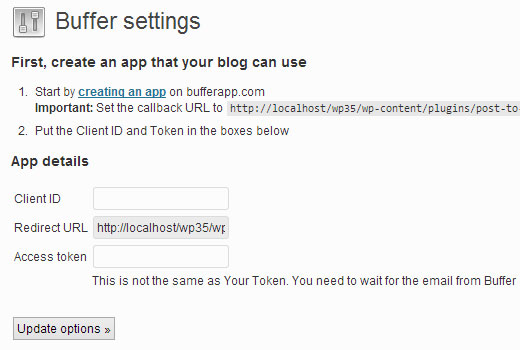
In order to connect your WordPress site to your Buffer account, you need to create a Buffer App. The plugin will show you a link to create an app. Below the link it will also show you a callback URL which you need to copy because you will need it in the next step. Click on creating an app link which will take you to Buffer App’s developer website.

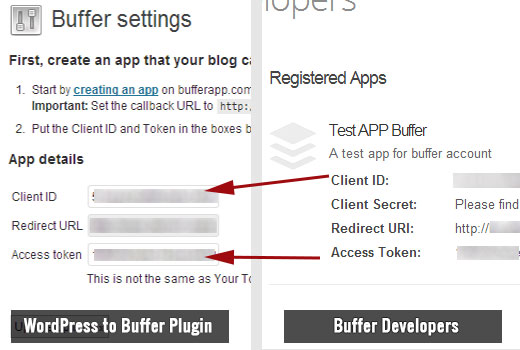
Provide a name and description for your app, for e.g. your website title and description. In the website field provide the URL of your site. In the callback URL field enter the URL shown by WordPress to Buffer plugin. After filling all the required fields, press the create application button. Buffer will now send you an email with a link to access your token. Clicking on that link will take you back to Buffer’s website where you can see your Client ID and Access token. Copy these and paste them into your WordPress to Buffer settings page.
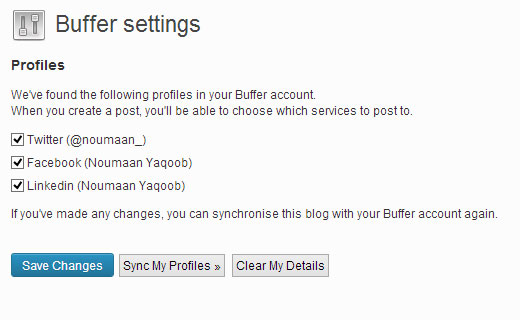
Once you click the update options button, WordPress to Buffer plugin will authenticate your website to buffer and will show all connected accounts to your Buffer profile. Select the accounts you want to post to and save changes.
Schedule or Publish Posts for Social Media using Buffer
To share your WordPress posts across your social media network, go to Posts » Add New. Scroll down and you will see Add to Buffer meta box.
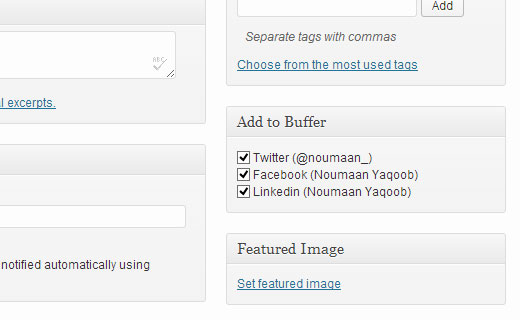
If you haven’t turned on scheduling on Buffer, then your WordPress post will be shared on selected social media websites as soon as you hit the publish button. To enable scheduling, go to BufferApp dashboard and click on Scheduling tab. You can set a timezone and select different times to share your posts.

We hope that this article helped you schedule WordPress posts for social media using BufferApp. Let us know what you are using to connect WordPress to your social media accounts by leaving a comment below.
To leave a comment please visit How to Schedule WordPress Posts for Social Media with BufferApp on WPBeginner.


No comments:
Post a Comment